

What Is GA4 Raw Data?
Google Analytics 4 (GA4) shifted from session-based tracking to an event-driven data model. Every user interaction — page views, clicks, scrolls, video plays, purchases — is recorded as a discrete event with associated parameters.
The “raw” GA4 export (via BigQuery linkage) gives you the underlying events table in its native structure:
{
  "event_name": "purchase",
  "event_timestamp": 1717420800000000,
  "event_params": [
    {"key": "transaction_id", "value": {"string_value": "TXN-98234"}},
    {"key": "value", "value": {"double_value": 149.99}},
    {"key": "currency", "value": {"string_value": "GBP"}}
  ],
  "user_pseudo_id": "1a2b3c4d",
  "platform": "WEB"
}
Unlike the GA4 UI reports (which aggregate and sample), the raw BigQuery export is unsampled, unaggregated, and contains every parameter — making it the source of truth for advanced analytics.
Why This Matters for Media & Advertising
| Capability | GA4 UI Reports | Raw BigQuery Export |
|---|---|---|
| Unsampled data | No (samples >100K events) | Yes |
| Custom event parameters | Limited | Full access |
| User-level attribution | Session-based only | Event-level, cross-channel |
| Ad spend reconciliation | Manual export | Automated joins |
| Incrementality testing | Not available | Full control |
| Lookback windows | Fixed (24h GAClicks) | Configurable (up to 90 days) |
For media buyers and performance marketers, raw GA4 data enables:
- True last-touch and multi-touch attribution by joining click IDs (
gclid,gbraid,wbraid) back to ad platform spend data - Return on Ad Spend (ROAS) calculated at the campaign, ad set, or keyword level — not just the channel level
- Incrementality measurement by comparing converted user cohorts against holdout groups
- Customer Lifetime Value (CLV) modelling using full event histories rather than aggregated sessions
- Fraud detection by analysing event patterns (impossible travel, bot signatures, velocity anomalies)
What Is the GARD Connector?
GARD (Google Analytics Raw Data) is a Snowflake Marketplace application that automatically ingests event-level GA4 data from BigQuery into your Snowflake account. It connects to the BigQuery Storage API and downloads data on a scheduled basis using Snowflake Tasks.
Key features:
- Managed ingestion — no Python environment, no cron jobs; runs natively inside Snowflake
- Multiple export types — supports Daily, Fresh Daily (GA360), Intraday (streaming), and User data tables
- Automatic schema mapping — creates flattened views alongside raw VARIANT tables
- Incremental intraday loads — near-real-time data with 8-hour default sync intervals
- Configurable scheduling — adjust sync frequency via Snowflake Tasks
Architecture Overview
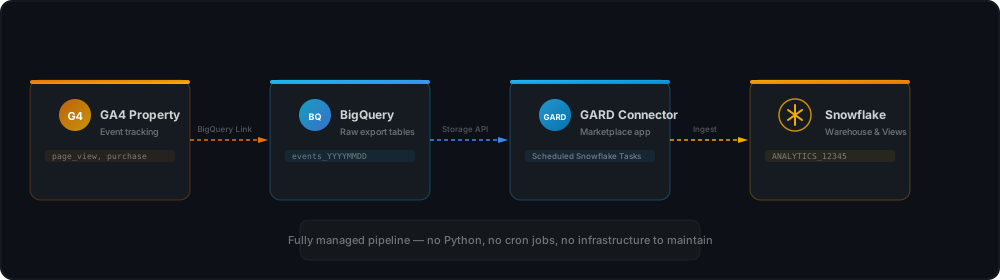
The connector temporarily owns the destination tables and views while installed. During uninstallation, ownership can be transferred to your own role so you retain the data.
Prerequisites
Before installing the connector:
- GA4 property with BigQuery linkage enabled (Admin → Product Linking → BigQuery Links)
- Google Cloud project with the Cloud Resource Manager API enabled
- Snowflake account (not a trial account — connectors are blocked on trials due to external access security)
- A user with ACCOUNTADMIN role, or a custom role with the required privileges listed below
Required Snowflake Privileges
If you’re not using ACCOUNTADMIN, your role needs:
EXECUTE TASKandEXECUTE MANAGED TASK(with grant option)EVENT_TABLEenabled on the account- Warehouse access:
CREATE WAREHOUSE, orOWNERSHIP, orUSAGE(with grant option) - Database access:
CREATE DATABASE, orOWNERSHIP, orUSAGE(with grant option) - Schema access:
CREATE SCHEMA, plusUSAGE,CREATE TABLE,CREATE VIEW(with grant option) on the destination schema CREATE INTEGRATIONprivilege (for authentication setup)
Step 1: Link GA4 to BigQuery
- In GA4, go to Admin → Product Linking → BigQuery Links
- Click Link and select your Google Cloud project
- Choose the export type(s):
- Daily —
events_XXXXXXtables, created once per day (available for all GA4 properties) - Fresh Daily —
events_fresh_XXXXXXtables, refreshed up to hourly (GA360 only) - Streaming —
events_intraday_XXXXXXtable, continuous export throughout the day - Users —
users_XXXXXXandpseudonymous_users_XXXXXXtables
- Daily —
It can take up to 24 hours for data to appear in BigQuery after enabling the link.
Step 2: Configure Google Cloud Authentication
The GARD connector supports two authentication methods. Choose one:
Option A: Service Account (recommended for production)
# Create the service account
gcloud iam service-accounts create ga4-snowflake-connector \
  --display-name="GA4 to Snowflake Connector" \
  --project=YOUR_PROJECT_ID

# Grant BigQuery read access
gcloud projects add-iam-policy-binding YOUR_PROJECT_ID \
  --member="serviceAccount:ga4-snowflake-connector@YOUR_PROJECT_ID.iam.gserviceaccount.com" \
  --role="roles/bigquery.dataViewer"

# Download the key file
gcloud iam service-accounts keys create sa-key.json \
  --iam-account=ga4-snowflake-connector@YOUR_PROJECT_ID.iam.gserviceaccount.com
You’ll need the client email and private key from this file during connector configuration.
Option B: OAuth 2.0
- In Google Cloud Console, go to APIs & Services → Credentials
- Create an OAuth client ID (type: Web application)
- Configure the authorized redirect URIs
- Note the Client ID and Client Secret for connector configuration
Step 3: Install the Connector from Snowflake Marketplace
- Sign in to Snowsight as a user with ACCOUNTADMIN role
- Navigate to Marketplace → Snowflake Marketplace
- Search for “Snowflake Connector for Google Analytics Raw Data”
- Click Get
- In the dialog:
- Application name — enter the database name for the connector instance (e.g.,
SNOWFLAKE_CONNECTOR_FOR_GOOGLE_ANALYTICS_RAW_DATA) - Warehouse used for installation — select a warehouse for the installation process only
- Application name — enter the database name for the connector instance (e.g.,
- Click Get, then Open
The installation warehouse is separate from the warehouse the connector uses for data sync. You’ll configure the sync warehouse in the next step.
Step 4: Configure the Connector
Access the connector at Catalog → Apps → Snowflake Connector for Google Analytics Raw Data. A configuration wizard will guide you through the setup.
4A: Warehouse, Database, Schema, and Role
The wizard creates these objects automatically, or you can specify existing ones:
| Field | Description |
|---|---|
| Warehouse | Dedicated warehouse for data sync (creates an X-Small by default) |
| Destination Database | Where GA4 data tables will land |
| Destination Schema | Where GA4 data tables and views will be created |
| Role | Custom role with read access to ingested data |
Click Configure when ready.
4B: Authentication
Select your authentication method and provide credentials:
Service Account:
- Upload the JSON key file, or manually enter:
- Client email — the service account email address
- Private key — paste the key content (remove
-----BEGIN PRIVATE KEY-----,-----END PRIVATE KEY-----, and\ncharacters)
OAuth 2.0:
- Client ID — from Google Cloud credentials
- Client Secret — from Google Cloud credentials
Click Connect. If using OAuth, you’ll be redirected to complete the Google authentication flow.
4C: Validate Source
The connector verifies it can access your GA4 data in BigQuery. On success, you proceed to data ingestion setup.
Step 5: Set Up Data Ingestion
Via Snowsight UI
- Navigate to Catalog → Apps → GARD Connector
- Go to the Data Sync section
- You’ll see a list of all available GA4 properties in your authorised GCP project
- Select the checkbox next to each property you want to ingest
- Click Start sync
Each property triggers two loads:
- Initial load — ingests all historical data, running backwards from today to the earliest available date
- Present load — ingests current and future data going forward
Via SQL (advanced)
-- Use the connector's installation database
USE DATABASE snowflake_connector_for_google_analytics_raw_data;

-- List available properties
CALL LIST_GA_PROPERTIES();

-- Grant connector access to destination schema
GRANT USAGE ON DATABASE dest_db TO APPLICATION snowflake_connector_for_google_analytics_raw_data;
GRANT USAGE ON SCHEMA dest_db.dest_schema TO APPLICATION snowflake_connector_for_google_analytics_raw_data;
GRANT CREATE TABLE ON SCHEMA dest_db.dest_schema TO APPLICATION snowflake_connector_for_google_analytics_raw_data;
GRANT CREATE VIEW ON SCHEMA dest_db.dest_schema TO APPLICATION snowflake_connector_for_google_analytics_raw_data;

-- Enable ingestion for a property (with initial historical load)
CALL ENABLE_PROPERTIES(
    PROJECT_ID => 'gcp_example_project',
    PROPERTY_IDS => ['12345678'],
    INITIAL_LOAD => TRUE,
    EXCLUDE_NULLS => TRUE
);

-- Enable without initial load (current data only)
CALL ENABLE_PROPERTIES(
    PROJECT_ID => 'gcp_example_project',
    PROPERTY_IDS => ['12345678'],
    INITIAL_LOAD => FALSE
);

-- Enable specific export types only
CALL ENABLE_PROPERTIES(
    PROJECT_ID => 'gcp_example_project',
    PROPERTY_IDS => ['12345678'],
    ENABLED_EXPORT_TYPES => ['DAILY', 'INTRADAY', 'USERS']
);
Available export types: DAILY, FRESH_DAILY (GA360 only), INTRADAY, USERS, PSEUDONYMOUS_USERS.
Step 6: Understand the Data Model
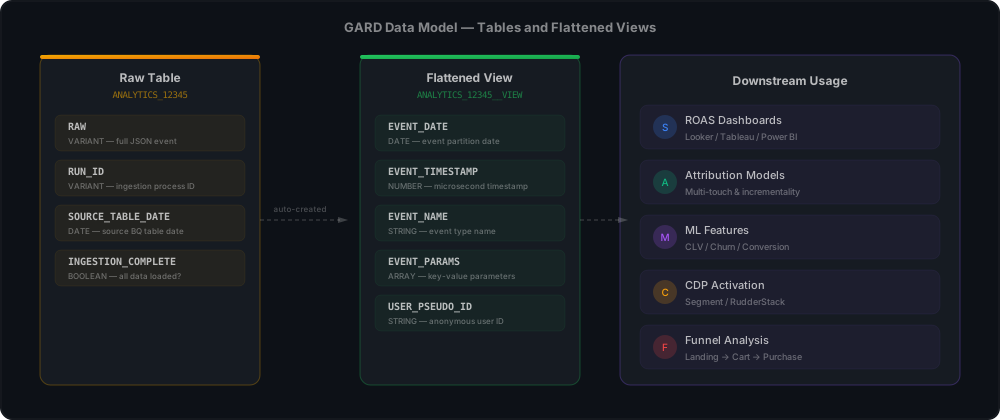
For each GA4 property, the connector creates tables and corresponding flattened views in your destination schema:
Raw Table Structure
Each raw table contains four columns:
| Column | Type | Description |
|---|---|---|
RAW |
VARIANT | Full event record as JSON |
RUN_ID |
VARIANT | ID of the ingestion process |
SOURCE_TABLE_DATE |
DATE | Source BigQuery table date |
INGESTION_COMPLETE |
BOOLEAN | Whether all data from that day has been loaded |
Flattened Views
The connector automatically creates __VIEW suffix views that map the VARIANT data into proper columns (EVENT_DATE, EVENT_TIMESTAMP, EVENT_NAME, EVENT_PARAMS, etc.). These are refreshed daily.
Views are only available for rows where
INGESTION_COMPLETEisTRUE.
Step 7: Configure Access for Your Team
-- Create a reader role
CREATE ROLE google_analytics_raw_data_reader_role;

-- Grant database and schema access
GRANT USAGE ON DATABASE dest_db TO ROLE google_analytics_raw_data_reader_role;
GRANT USAGE ON SCHEMA dest_db.dest_schema TO ROLE google_analytics_raw_data_reader_role;

-- Grant the connector's DATA_READER application role
GRANT APPLICATION ROLE SNOWFLAKE_CONNECTOR_FOR_GOOGLE_ANALYTICS_RAW_DATA.DATA_READER
  TO ROLE google_analytics_raw_data_reader_role;

-- Assign to users
GRANT ROLE google_analytics_raw_data_reader_role TO USER analyst_jane;
Step 8: Verify the Data
-- Check row counts by date
SELECT
  SOURCE_TABLE_DATE AS event_date,
  COUNT(*) AS event_count,
  INGESTION_COMPLETE
FROM dest_db.dest_schema.ANALYTICS_12345
GROUP BY 1, 3
ORDER BY 1 DESC;

-- Query the flattened view for top events
SELECT
  EVENT_NAME,
  COUNT(*) AS occurrences
FROM dest_db.dest_schema.ANALYTICS_12345__VIEW
GROUP BY 1
ORDER BY 2 DESC
LIMIT 20;

-- Check click ID capture for attribution
SELECT
  param.key AS click_param,
  COUNT(*) AS with_click_id
FROM dest_db.dest_schema.ANALYTICS_12345__VIEW e,
LATERAL FLATTEN(input => e.EVENT_PARAMS) param
WHERE param.value:key::STRING IN ('gclid', 'gbraid', 'wbraid')
GROUP BY 1;
Ingestion Scheduling and Reloads
Default Schedule
The connector runs a Snowflake Task that checks for new BigQuery tables every 8 hours by default. You can adjust this:
-- Change sync interval to every 4 hours
CALL CONFIGURE_INGESTION_INTERVAL(INTERVAL_HOURS => 4);
Intraday (Streaming) Behaviour
When the connector detects the latest intraday table in BigQuery, it switches to incremental mode, downloading new batches at the configured interval. It performs a final ingestion when:
- A next-day table appears in BigQuery, or
- 24 hours have passed since the first load for that table
A verification step checks for lost events (delayed >10 minutes) and triggers an automatic reload if needed.
Manual Reloads
-- Reload all data for a property
CALL RELOAD_PROPERTY('12345678');

-- Reload a date range
CALL RELOAD_PROPERTY('12345678', '2026-05-01'::DATE, '2026-05-31'::DATE);

-- Reload a specific export type for a date range
CALL RELOAD_PROPERTY('12345678', 'DAILY', '2026-05-01'::DATE, '2026-05-31'::DATE);

-- Monitor ongoing reloads
SELECT * FROM PUBLIC.ONGOING_RELOADS;

-- Cancel a reload
CALL CANCEL_RELOAD_PROPERTY('<load_id>');
Google can update daily tables for up to 72 hours after creation. The connector automatically reloads tables within this window. Updates after 72 hours require a manual reload.
Using GA4 Data in Downstream Systems
Build a Cleaned Events View
The flattened view gives you top-level columns, but EVENT_PARAMS is still an array that needs flattening for practical use:
CREATE OR REPLACE VIEW dest_db.dest_schema.CLEAN_EVENTS AS
SELECT
  EVENT_DATE,
  EVENT_TIMESTAMP,
  EVENT_NAME,
  USER_PSEUDO_ID,
  PLATFORM,
  -- Flatten common parameters
  MAX(CASE WHEN param.key = 'page_location' THEN param.value:string_value::STRING END) AS page_url,
  MAX(CASE WHEN param.key = 'page_title' THEN param.value:string_value::STRING END) AS page_title,
  MAX(CASE WHEN param.key = 'session_id' THEN param.value:int_value::NUMBER END) AS session_id,
  MAX(CASE WHEN param.key = 'transaction_id' THEN param.value:string_value::STRING END) AS transaction_id,
  MAX(CASE WHEN param.key = 'value' THEN param.value:double_value::FLOAT END) AS event_value,
  MAX(CASE WHEN param.key = 'currency' THEN param.value:string_value::STRING END) AS currency,
  -- Click attribution IDs
  MAX(CASE WHEN param.key = 'gclid' THEN param.value:string_value::STRING END) AS gclid,
  MAX(CASE WHEN param.key = 'gbraid' THEN param.value:string_value::STRING END) AS gbraid,
  MAX(CASE WHEN param.key = 'wbraid' THEN param.value:string_value::STRING END) AS wbraid,
  -- Traffic source
  MAX(CASE WHEN param.key = 'google_campaign_id' THEN param.value:string_value::STRING END) AS campaign_id,
  MAX(CASE WHEN param.key = 'google_campaign_name' THEN param.value:string_value::STRING END) AS campaign_name,
  MAX(CASE WHEN param.key = 'medium' THEN param.value:string_value::STRING END) AS medium,
  MAX(CASE WHEN param.key = 'source' THEN param.value:string_value::STRING END) AS source,
  MAX(CASE WHEN param.key = 'term' THEN param.value:string_value::STRING END) AS term
FROM dest_db.dest_schema.ANALYTICS_12345__VIEW,
LATERAL FLATTEN(input => EVENT_PARAMS) param
GROUP BY 1, 2, 3, 4, 5;
Join With Ad Spend Data
Load your Google Ads or Meta Ads spend data into Snowflake and join on click IDs:
-- ROAS by campaign
SELECT
  c.campaign_name,
  SUM(CASE WHEN e.event_name = 'purchase' THEN e.event_value ELSE 0 END) AS revenue,
  s.total_cost AS ad_spend,
  COUNT(DISTINCT CASE WHEN e.event_name = 'purchase' THEN e.user_pseudo_id END) AS purchasers,
  CASE
    WHEN s.total_cost > 0
    THEN SUM(CASE WHEN e.event_name = 'purchase' THEN e.event_value ELSE 0 END) / s.total_cost
    ELSE NULL
  END AS roas
FROM dest_db.dest_schema.CLEAN_EVENTS e
LEFT JOIN marketing.google_ads_campaigns c
  ON e.campaign_id = c.campaign_id
LEFT JOIN marketing.google_ads_spend s
  ON e.campaign_id = s.campaign_id
  AND e.event_date = s.date
WHERE e.gclid IS NOT NULL
GROUP BY 1, 3;
Conversion Funnel Analysis
-- Funnel: landing → product view → add to cart → purchase
WITH steps AS (
  SELECT
    USER_PSEUDO_ID,
    MAX(CASE WHEN EVENT_NAME = 'first_visit' THEN 1 ELSE 0 END) AS landed,
    MAX(CASE WHEN EVENT_NAME = 'view_item' THEN 1 ELSE 0 END) AS viewed_product,
    MAX(CASE WHEN EVENT_NAME = 'add_to_cart' THEN 1 ELSE 0 END) AS added_to_cart,
    MAX(CASE WHEN EVENT_NAME = 'purchase' THEN 1 ELSE 0 END) AS purchased
  FROM dest_db.dest_schema.CLEAN_EVENTS
  WHERE EVENT_DATE >= DATEADD('month', -1, CURRENT_DATE())
  GROUP BY 1
)
SELECT
  SUM(landed) AS step_1_landed,
  SUM(viewed_product) AS step_2_viewed,
  SUM(added_to_cart) AS step_3_cart,
  SUM(purchased) AS step_4_purchase,
  SUM(purchased) * 100.0 / NULLIF(SUM(landed), 0) AS overall_conversion_rate
FROM steps;
Feed Downstream Tools
With cleaned events in Snowflake, you can:
- Build Looker / Tableau dashboards directly against the
CLEAN_EVENTSview - Power a semantic layer (dbt metrics, MetricFlow) for consistent KPI definitions across tools
- Export to a CDP (Segment, RudderStack) for activation — e.g., trigger email flows when a user abandons cart
- Train ML models — predict CLV, churn probability, or conversion likelihood using full event histories
Cost Considerations
| Component | Estimated Cost | Notes |
|---|---|---|
| BigQuery export | $0 | Free with GA4 standard linkage |
| BigQuery Storage API reads | ~$5-20/month | Depends on event volume; connector reads efficiently |
| Snowflake storage | ~$23/TB/month | Raw events compress well (~40:1 ratio) |
| Snowflake compute (X-Small warehouse) | ~$3/hour active | Only runs during scheduled syncs |
| Connector licensing | Check Marketplace | May have per-property or flat pricing |
| Total (typical mid-size site) | ~$100-300/month | For 1M+ events/day |
Known Limitations
- GA4 only — Universal Analytics is not and will not be supported
- No trial accounts — connectors are blocked on Snowflake trials
- No government regions — unavailable in restricted regions
- One GCP project per property — switching the export to a different project requires reinstalling the connector
- Schema ownership — the connector owns destination tables while installed; use the uninstall flow to transfer ownership if needed
- No custom date formats — the connector will not work correctly if custom date formats are set on the account
- AUTOCOMMIT required — must be enabled in any session interacting with the connector
Troubleshooting
| Symptom | Fix |
|---|---|
LIST_GA_PROPERTIES() returns no results |
Verify BigQuery export is configured and data has appeared (can take up to 24 hours); check service account roles |
| Authentication fails | For service accounts, ensure you removed the PEM header/footer and \n from the private key; for OAuth, verify redirect URIs |
INGESTION_COMPLETE stays FALSE |
The intraday table is still being populated; wait for the next sync cycle or check BigQuery for new data |
| Missing event parameters | GA4 only exports parameters marked as events in property settings; enable custom definitions in GA4 Admin |
| Slow initial load | Use a larger warehouse for the connector; the initial load runs backwards through all historical data |
| Click IDs not captured | Ensure enhanced measurement is enabled in GA4 and relevant parameters are collected |
| Connector errors after schema change | If a BigQuery column type changes, the existing view column is changed to VARIANT; check the view definition |
Summary
The GARD connector provides a fully managed pipeline from GA4’s raw BigQuery export into Snowflake — no Python environments, no cron jobs, no infrastructure to maintain. It runs as a Snowflake Marketplace application with automatic schema mapping, incremental intraday loads, and configurable scheduling.
Once the data is in your warehouse, you can join it with ad spend, CRM, and transactional data to build attribution models, ROAS dashboards, and ML features that the GA4 UI simply cannot provide. For any organisation spending meaningfully on digital advertising, the insight gained from raw event data far outweighs the setup effort.